Image to Video AI Generator with Audio
Animate photos and reference images into short AI videos on bestimage.ai. Start with free credits, upload an image, describe the motion, choose a supported image-to-video model, and generate smooth clips for products, portraits, social posts, ads, and creative concepts.
Examples of Image to Video AI Generator
Image to Video AI Generator examples show how a source image can become a moving clip with prompt-guided action, camera movement, visual consistency, and optional audio when the selected model supports it.
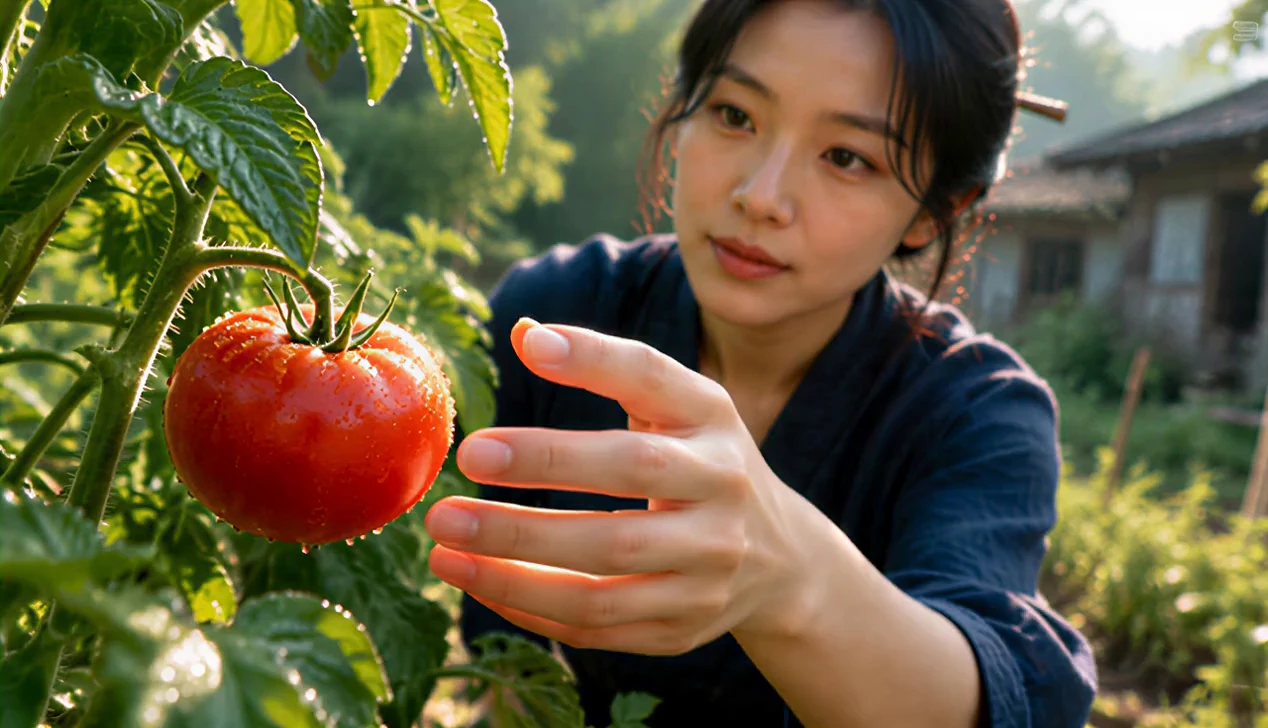
[Style] Modern Rural Aesthetics, Cinematic Commercial quality, shot with Sony A7S3/cinema camera, 4K/8K ultra-clear, Extreme Macro, natural transparent lighting, healing ASMR, no historical costume drama feel. [Scene] A well-maintained modern farmhouse open kitchen, background is a lush vegetable garden, bright sunshine. [Character] Modern Rural Creator, black long hair casually tied up with a wooden hairpin, wearing a dark blue comfortable linen outfit, clear makeup, focused and peaceful eyes. [Shot Details] [00:00-00:05] Shot 1: Morning Harvest (The Freshness) Visuals: High-definition close-up. Morning sunlight hits the plants with side backlighting. Action: The Creator's bare hands (long, clean fingers) pick a bright red tomato with glistening dew drops from the vine. Details: Extremely sharp focus, clearly showing the fuzz on the tomato surface and the trajectory of sliding water droplets. Background is blurred high-quality green. [00:05-00:10] Shot 2: Extreme Craftsmanship (The Craft) Visuals: Indoor stove area, full of life but spotless. Action: The Creator is cutting vegetables, movements are skilled and precise (non-performance nature). Details: Macro lens captures the moment the knife blade slices through the ingredients, juice splattering. Then switches to the orange flame flickering in the earthen stove, light and shadow are warm and real. [00:10-00:15] Shot 3: Tranquil Time (The Moment) Visuals: Full shot/Medium shot. Action: A delicate home-cooked dish is placed on the wooden long table in the yard. The Creator sits down quietly, gently tidies a stray hair, and picks up a bite of food. Atmosphere: Steam slowly rises against the backlight, the scene is so quiet you can almost hear the wind, showcasing the ultimate sense of relaxation modern people yearn for.
Image-to-Video Generator Features
Combine uploaded images with prompt-guided motion, multi-model animation, optional end-frame control, flexible video settings, and transparent credit estimates in one online video workflow.
Reference Image Guided Animation
Upload a product photo, portrait, character image, design visual, or scene reference so the AI model can preserve key details while generating motion.
Prompt-Guided Motion Control
Describe what should move, how the camera should behave, what mood to create, and which source-image details should stay stable.
Multi-Model Image-to-Video Creation
Choose from supported image-to-video models to compare motion style, realism, speed, quality, audio support, and pricing across different providers.
Flexible Frames and Video Settings
Adjust supported options such as duration, aspect ratio, resolution, sound, end frame, seed, camera lock, and negative prompt according to the selected model.
Image-to-Video Use Cases
Use bestimage.ai Image to Video Generator when an existing image should anchor the video, whether you need product motion, portrait animation, campaign content, or a fast visual concept.
Product and E-Commerce Videos
Turn product photos, packaging images, mockups, and ecommerce visuals into short motion clips for ads, landing pages, social posts, and launch campaigns.
Portrait and Character Animation
Animate portraits, avatars, character art, fashion images, and lifestyle photos while keeping the important look of the source image.
Social Media Video Creation
Create scroll-ready clips from still images for TikTok, YouTube Shorts, Instagram Reels, thumbnails, story posts, and paid social tests.
Design and Concept Previews
Transform concept art, posters, storyboards, moodboards, and visual explorations into motion previews for review, pitch decks, and creative iteration.
How to Generate Videos From Images
Upload a reference image, write the motion prompt, choose a model, then generate and refine your image-guided AI video.
Upload Your Reference Image
Start with the photo, product image, portrait, design, or visual reference you want to animate. Some models also support an end frame.
Describe the Motion
Write a prompt explaining the action, camera movement, emotion, lighting, pacing, background change, and source-image details that should remain stable.
Generate, Preview, and Refine
Choose a supported image-to-video model, generate the clip, preview the result, then refine the prompt or settings for a better version.
Explore More AI Models for Media Creation
Discover more image, video, and chat models on bestimage.ai, with model pages that include capabilities, pricing details, API examples, and playground access.
 seedance-v2.5-text-to-videotext-to-video
 gemini-omni-1.1-flash-reference-to-videoreference-to-videoveo3.1-fast-text-to-videotext-to-videoseedance-v2.0-reference-to-videoreference-to-video
 minimax-h3-reference-to-videoreference-to-video
 wan-2.6-text-to-videotext-to-videoseedance-v2.0-image-to-videoimage-to-videogemini-omni-1.1-flash-video-editvideo-edit