Text to Video AI Generator: Create video from prompts
Create stunning videos from text prompts with Top Model like Seedance 2.0, Google Veo 3.1 etc. Choose leading text-to-video models, describe the scene, motion, camera, and style, then generate smooth short videos for ads, social media, storytelling, education, and creative production.
Examples of Text to Video AI Generator
Text to Video AI Generator examples show how prompt-only ideas can become dynamic clips with clear motion, cinematic framing, realistic physics, and optional audio when the selected model supports it.
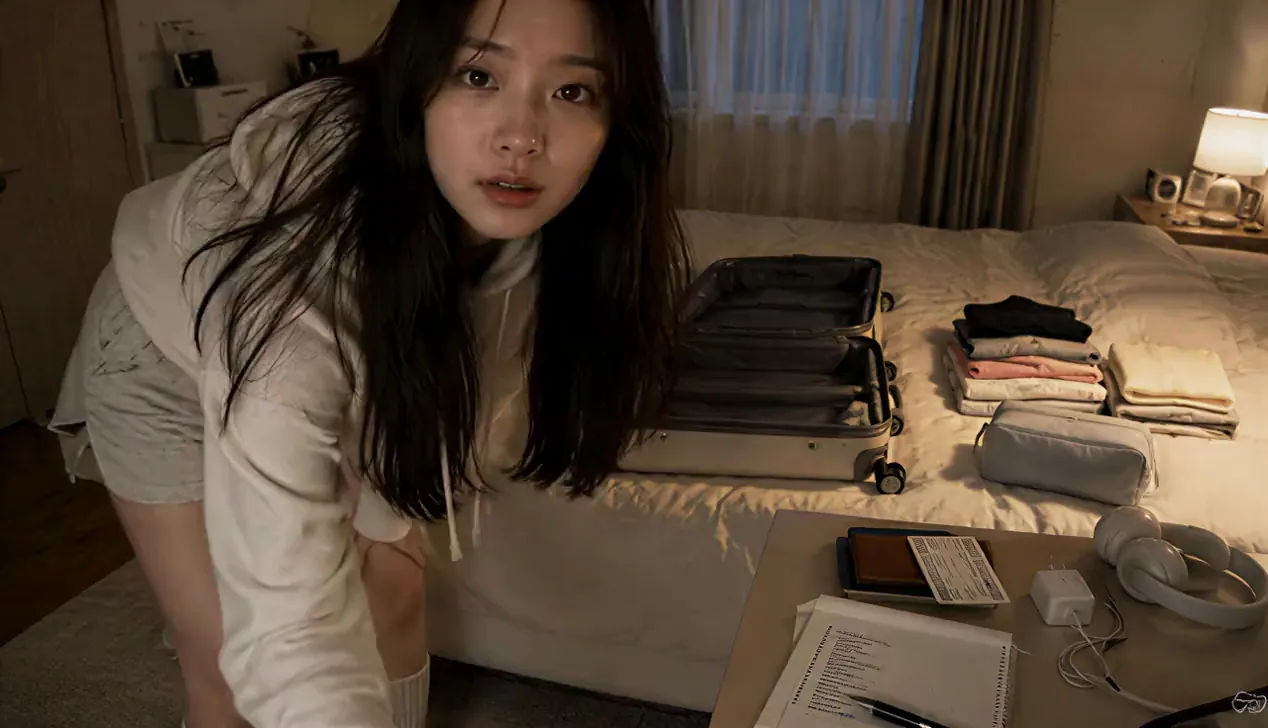
Duration: 15 seconds | Aspect ratio: 16:9 horizontal. CAMERA / LOOK: Handheld MiniDV camcorder footage filmed by the subject herself. Slight hand shake, occasional focus hunting, imperfect framing, natural zoom adjustments, soft tape-like image quality, subtle grain, realistic auto-exposure shifts, natural skin tones, mild motion blur. STYLE: Cozy weekend packing vlog with gentle ASMR. Relaxed pacing, candid body language, minimal dialogue. SUBJECT: Young Korean woman in her 20s with long straight black hair, oversized cream hoodie, loose lounge shorts, cozy socks, natural makeup. Keep her identity, outfit, room and suitcase consistent. SETTING: Small bedroom on Friday evening, warm bedside lamp, open suitcase on the bed, organized clothes and travel essentials. 00:00–00:03 Propped medium shot: she places the camera on a shelf, sits beside the suitcase and says quietly, “Packing for a little weekend escape.” 00:03–00:06 Overhead shot: she folds and rolls two sweaters into the suitcase; clear fabric rustling. 00:06–00:09 Close handheld inserts: skincare bottles click into a pouch, then charger, headphones and notebook slide into a side compartment. 00:09–00:12 She checks a handwritten list, places a travel wallet and train ticket into her handbag and smiles at one forgotten item. 00:12–00:15 She presses the suitcase closed, pulls the zipper in one satisfying motion, sets it beside the door, then covers the lens with her hand: “See you on the trip.” AUDIO: Natural room ambience, fabric, pouch clicks, paper, zipper and soft footsteps. No music. Realistic pauses, blinking and one tiny packing mistake; personal vlog, not a polished commercial.
Text-to-Video Generator Features
Generate videos from natural-language prompts with multi-model access, prompt-driven motion control, flexible video settings, optional audio support, and transparent credit estimates in one online workflow.
Leading Multi-Model Video Generation
Switch between supported text-to-video models from providers such as ByteDance, Google, Kling, Alibaba, Vidu, Pixverse, OpenAI, and xAI to match different creative goals.
Prompt-First Motion Control
Describe the subject, scene, action, camera movement, lighting, mood, pacing, and visual style so the selected AI model can turn your written direction into motion.
Flexible Video and Audio Settings
Adjust model-specific settings such as aspect ratio, duration, resolution, sound, camera lock, seed, and negative prompt when the chosen model supports them.
Clear Credit Cost Before Generation
Review the estimated credit cost before creating a video, with pricing adapted to the selected provider, model, duration, resolution, audio option, and current rules.
Text-to-Video Use Cases
Use bestimage.ai Text to Video Generator when you want to create a short video directly from a written concept, without preparing source footage or uploading a reference image.
Marketing and Product Videos
Create campaign concepts, product teasers, launch clips, social ads, brand openers, and promotional shorts from a written creative brief.
Social Media Short Videos
Generate vertical or widescreen clips for TikTok, YouTube Shorts, Instagram Reels, paid social tests, content calendars, and creator-style posts.
Storyboards and Cinematic Concepts
Turn scene descriptions, character actions, camera notes, mood references, and visual directions into quick motion drafts for review and iteration.
Education and Explainer Content
Create simple animated scenes, course visuals, concept demonstrations, training clips, and presentation videos that make abstract ideas easier to understand.
How to Generate Videos From Text
Write a clear prompt, choose a video model, adjust supported settings, then generate and refine your AI video online.
Input Your Video Prompt
Describe the subject, setting, action, camera angle, movement, lighting, emotion, visual style, and final purpose of the video.
Choose Model and Settings
Select a provider and text-to-video model, then set supported options such as ratio, duration, resolution, sound, seed, camera control, or negative prompt.
Generate, Preview, and Refine
Create your video, review the result, adjust the prompt or model settings, then generate another version until the motion fits your goal.
Explore More AI Models for Media Creation
Discover more image, video, and chat models on bestimage.ai, with model pages that include capabilities, pricing details, API examples, and playground access.
 veo3.1-fast-image-to-videoimage-to-video
 gpt-image-2.5-flare-editimage-to-imagegpt-image-2.5-sunburst-editimage-to-image
 seedream-v5.0-pro-editimage-to-imageveo3.1-fast-text-to-videotext-to-videoseedance-v2.0-mini-image-to-videoimage-to-video
 wan-2.6-text-to-videotext-to-video
 minimax-h3-image-to-videoimage-to-video